So I needed to make sure my site was accessible – easy right? Just right-click anywhere on the page, choose Inspect, and if you have Lighthouse installed as a dev tool you can run accessibility checks on any live site you’re visiting! This will get you pretty far, but I’ve found a tool I’m really loving that works on both live sites and local sites (with a little magic, of course).
The WAVE browser extension is available on Chrome, Firefox, and Edge, and I have to say, it’s become a favorite of mine quickly. NVDA is cool and everything, but having all the parseable keyboard navigation landmarks in a list is so nice:
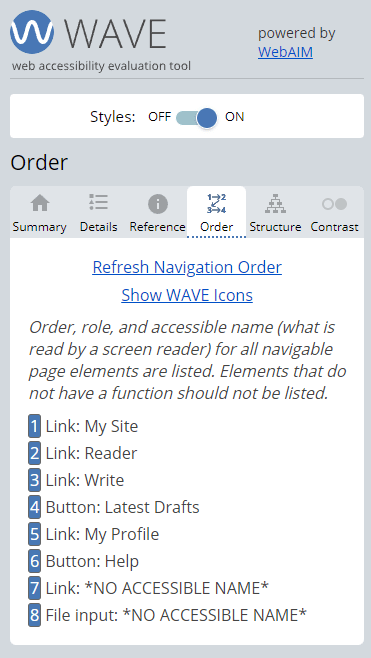
This little window does a whole lot more – it keeps a list of active errors and warning your site has, and it responds to changes in your browser. This means, if you have some HTML you’d like to test without all the hassle of pushing up to a live site for a checker like Lighthouse, you can edit the HTML for the current page you’re visiting to be anything at all, including an entirely new source file. In order to check some work I’d completed locally, I just visited this blog site’s landing page and pasted my local file right over the source in browser. Surely enough, the WAVE readout changed and presented me with a list of things to note.
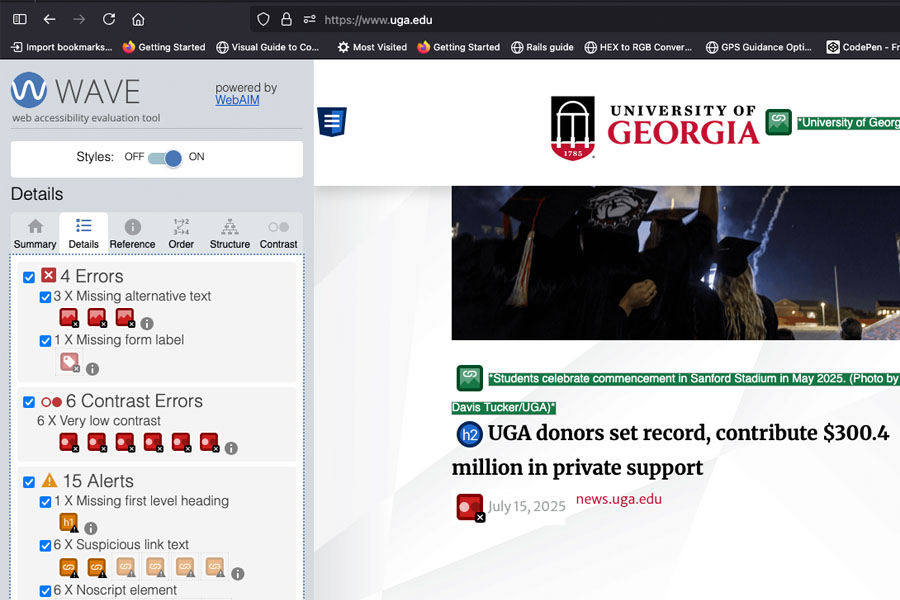
Unfortunately, while these errors are easy to find and remediate even established and reputable sites fail to pay attention to these details. There are more problems to be found on the following site that WAVE didn’t pick up on, too. I emailed the owner of this site and got a response on 4/4/2025 saying they planned to correct parts of the site this year.
I had to share this great tool, it makes Accessibility checking just a bit easier. You can’t rely on these checkers entirely, as per usual; the way users digest your content won’t always fit every model, and you should always follow a checker like this up with a manual audit using a screen reader like NVDA. I hope you find this post a helpful pointer to a great asset for your web kit arsenal. Give the creators props on their plugin page and spread the word!
 Aaron McCoy
Leave a comment